What's new in August 2026
Here is what changed on the platform in August: first the main changes, with what they let you do, then the other improvements by module, and finally the fixes.
- EDIT: a series of improvements from the field.
- Completed works: track actual progress and update your equipment.
- Open data: your portfolio is enriched automatically.
This month at a glance
EDIT: a series of improvements from the field
Why. These improvements come straight from the feedback of several customers, gathered during acceptance testing, an on-site visit and from their contractors. The goal: faster surveys on tablet and fewer steps between two annotations.
What changes.
- Taking photos from the device on Android and Chrome, in addition to iPad.
- Moving an annotation by simply dragging it, with its attachment updated automatically.
- Filters by meta-library and by portfolio, on lists and annotations.
- Property name in the Annotations tab, building address in the selection cards.
- Easier-to-read pins on large plans, and a lighter display of floor and wall coverings.
- Type selector that opens directly on the current type, and a toggle between 2D Plan and Attributes.
- Property search that ignores case and accents, and accepts partial entries.
- Plan colouring by theme, including offline, and a layers panel to show or hide drawing lines, dimensions and room names.
- Labels (room names, rental management codes) and dimensions displayed on demand, turned off by default for a clearer plan that loads faster.
Good to know. These improvements apply to all organisations and do not require reinstalling the application.
See also: Running a field survey with EDIT
Completed works: track actual progress and update your equipment
This change applies to organisations equipped with Graphlake.
Why. Property managers need to know what has actually been done, so that the portfolio reflects reality and the next programming starts from up-to-date data, without re-entering anything in the plans.
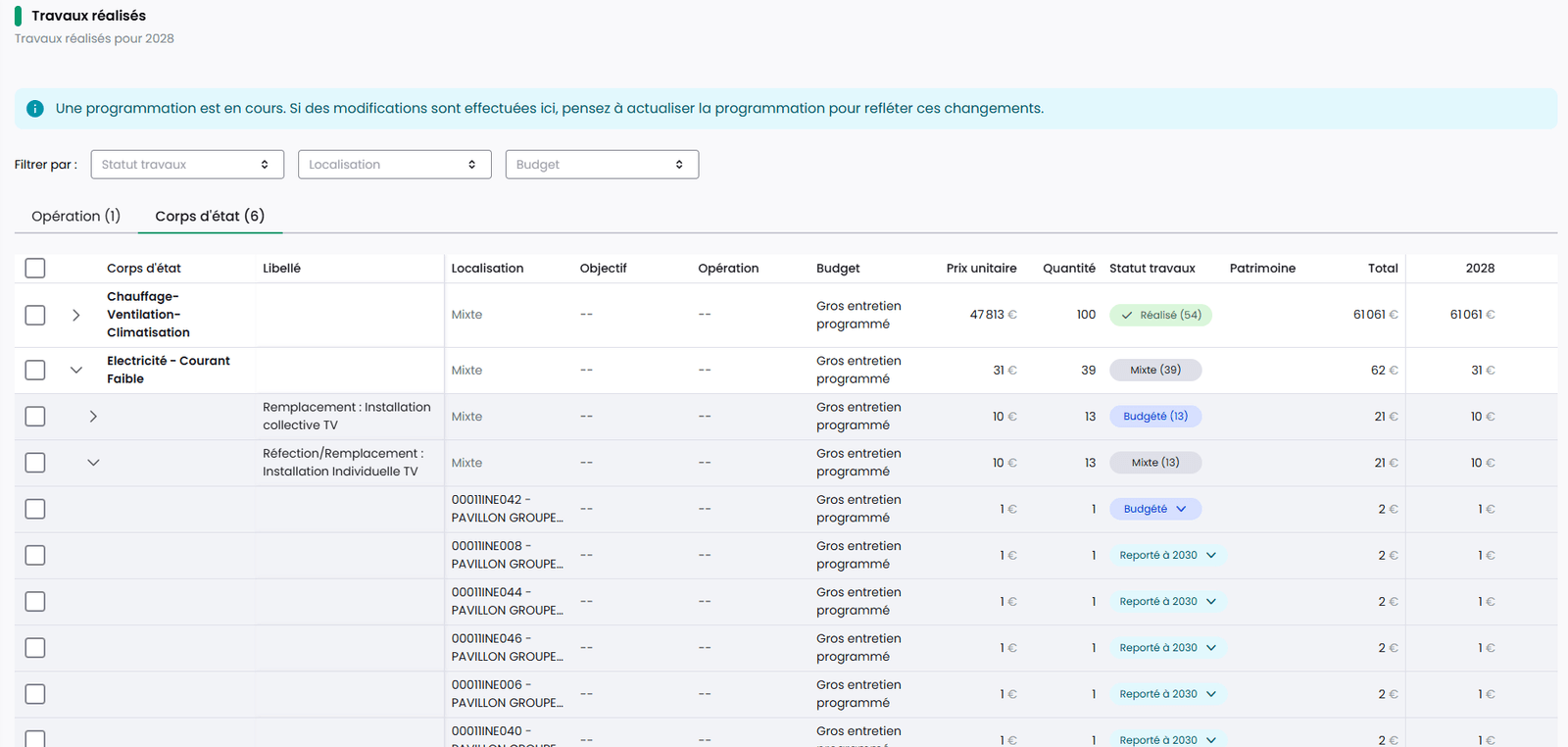
What changes. A "Completed works" tab appears in the navigation of a programming as soon as a first programming has been validated. Each line has a status, Budgeted, Completed, Postponed or Cancelled, which can be changed one by one or in bulk. Entry is never blocking: it can be done at any time of the year, including while a new programming is in progress.
Switching to Completed asks for a handover date and a reference condition, shows a summary of the old and new value for each component, then updates the portfolio. A line switched to Completed can be reset, restoring the previous data if needed.
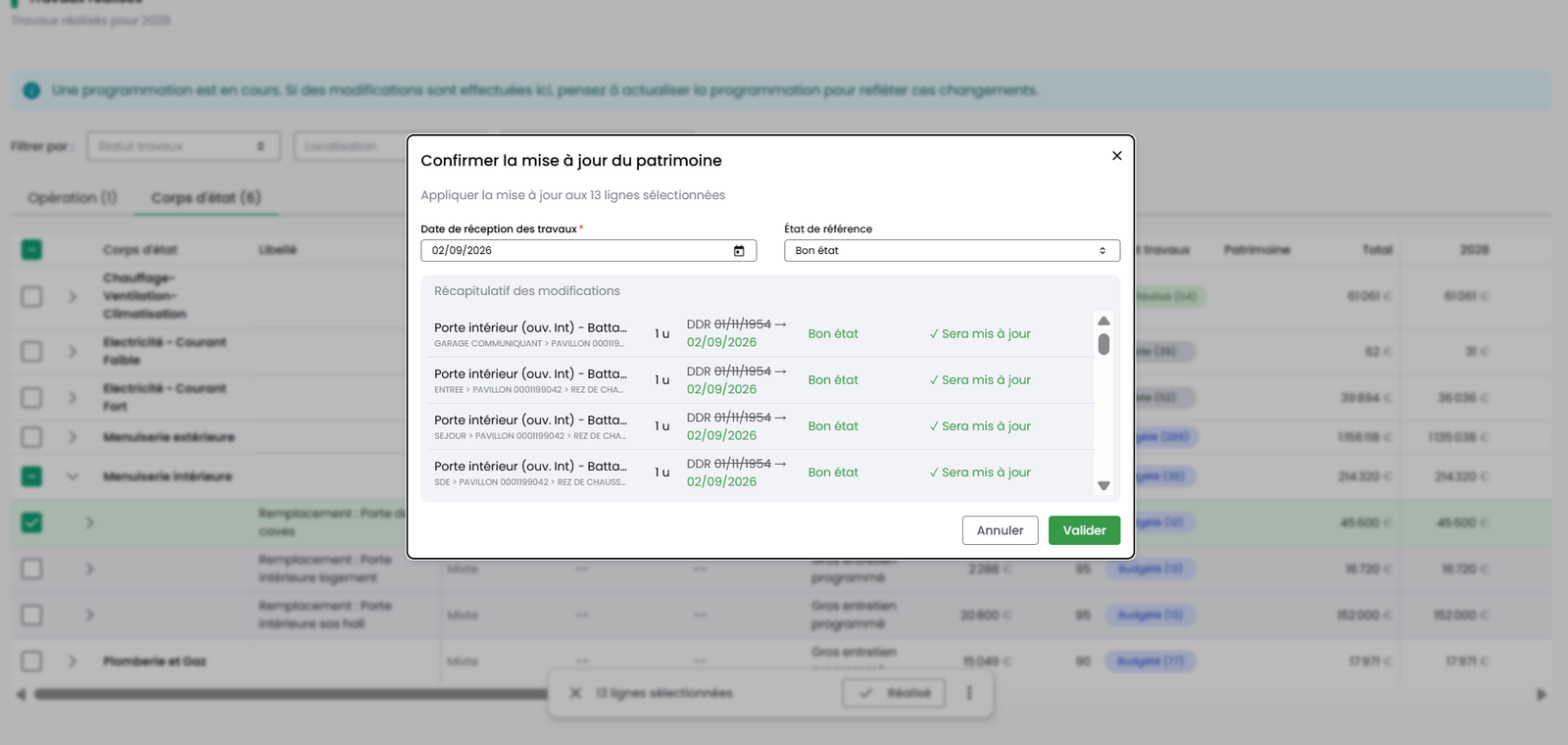
Example. A property manager selects in bulk the works lines that were actually carried out and switches them to Completed in one action, during the year or at the end of a campaign: the equipment concerned has its date and reference condition updated, without reopening the plans.
Permissions. Everyone can view the tab. Validating completed works requires edit rights on Works Plans.
See also: Building a multi-year works plan
Last renewal date filled in automatically
This change applies to organisations equipped with Graphlake.
Why. On the portfolios observed, seven last renewal dates out of ten were missing. Yet this date is essential to the Works Plans calculation.
What changes. Any equipment created without a last renewal date, whatever its origin (Revit model, import, API), receives the construction date of its building, or failing that of the site. Without any other information, this is the most cautious assumption: equipment never renewed since construction.
This date remains a default value, to be corrected as soon as a real renewal date is known: it does not mean the equipment was checked on that date. Any date entered afterwards takes precedence. Existing equipment has been completed in the same way.
Good to know. A construction date entered after the equipment was created does not trigger this fill-in.
Your portfolio is enriched automatically with open data
This change applies only to organisations equipped with Graphlake.
Why. Some of a building's characteristics already exist in public databases. Retrieving them saves data entry or a field survey, provided you know where each value comes from.
What changes. Fifteen building characteristics are retrieved automatically, with no data entry:
- type, energy and generator for heating and domestic hot water;
- structure, facade, facade and roof insulation, flat roof;
- type of openings and external shutters;
- ventilation system and presence of balconies.
Retrieval relies on the building's BDNB identifier. It is obtained either from the energy performance certificates (DPE) stored in the Stonal Smartdoc document management system (ADEME number, then RNB, then BDNB), or by entering the RNB or BDNB identifier directly. The result can be viewed in the "Open data" report, which you make available to users through report groups. In the General information tab, each value concerned is flagged as coming from open data.
Example. On a portfolio made up mostly of housing whose energy performance certificates are already in Stonal Smartdoc, retrieval fills in part of the building characteristics without a field survey, and the report shows the share actually retrieved.
Good to know. To benefit from it, first get in touch with the Stonal teams: an initial retrieval has to be launched. The amount of information varies widely from one building to another, and remains low for commercial property.
See also: General information for a property
Contacts and contracts: import and export, units in scope, parent company
Why. The module did not let you load contacts in bulk, structure individuals and legal entities, or extend a contract to rented units. Several customers asked for it, to load dozens of legal entities, make their operators' contact details readable, or manage their leases.
What changes.
- Import of a CSV file (which you can fill in with Excel), checked before processing, with errors reported line by line, then follow-up of the import in a history with a downloadable report.
- Export of contacts and of equipment under contract in CSV format, from a drop-down menu.
- Rented units can be added to the scope of a contract, with search.
- A "Parent company" section on a legal entity's record, and display of the individuals linked to it.
- New layout for the contact card and the detail panel, which shows the components concerned.
Example. You are taking over all the maintenance contracts of a portfolio: you export what exists, complete the file offline, then re-import it in one go.
See also: Managing your contacts and operators
Plans tab: find a unit by its code and measure a distance
This change applies to organisations equipped with Graphlake.
Why. Two Model on Platform features were missing on Graphlake: search by rental management code and the measuring tool.
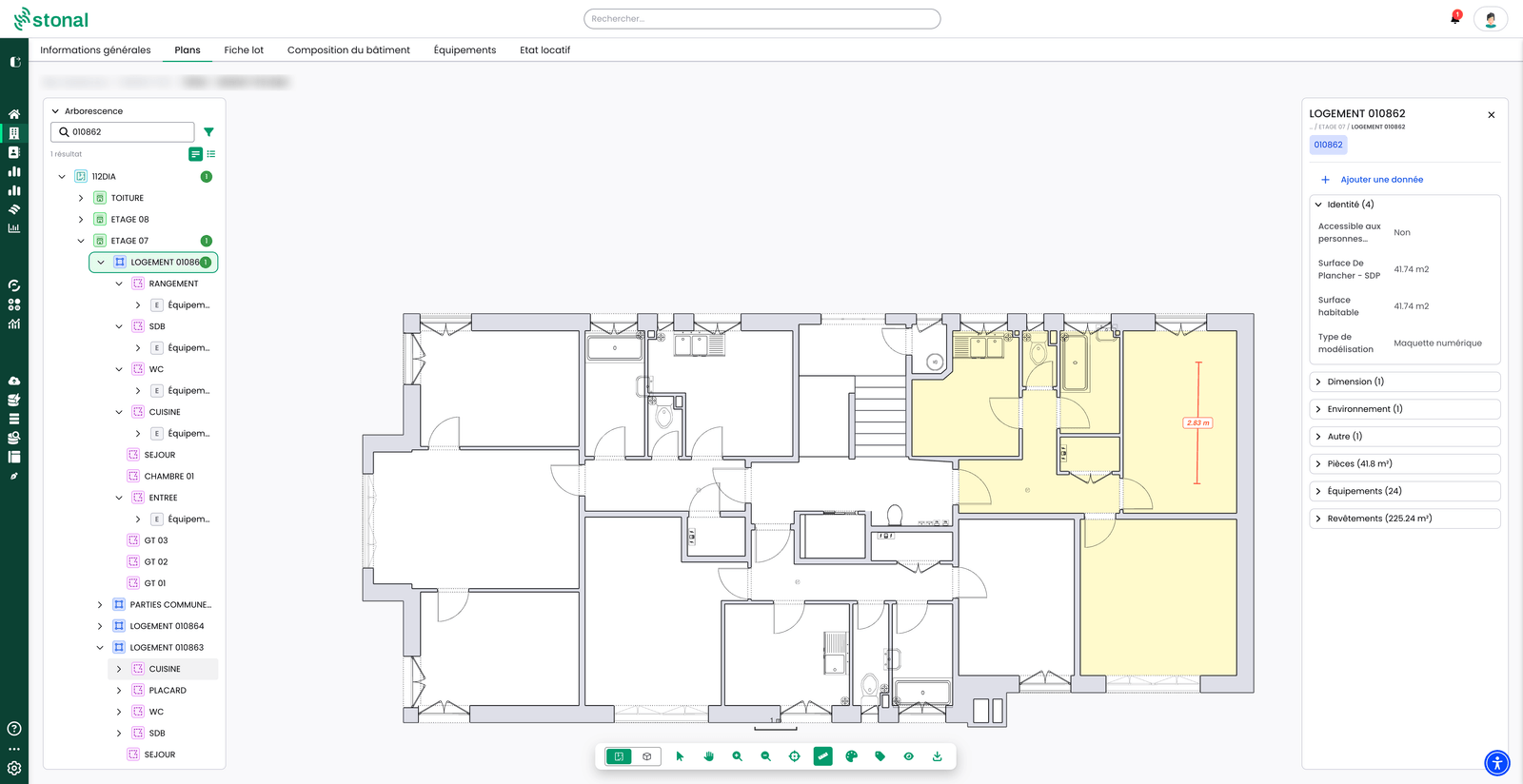
What changes. The tree search bar now accepts the rental management code, regardless of case, and highlights the unit on the plan. A ruler icon turns on measuring mode: one click for the start, one click for the end, and the distance is shown in metres. Measurements can follow one another; press Esc to exit.
See also: The plans of a property
See the validity period of a value in the query tool
This change applies to organisations equipped with Graphlake.
Why. The validity period of a value was stored, but could not be displayed or exported.
What changes. On a property, a building or a piece of equipment, the effective date and expiry date columns can be added like any other. They appear in the preview, in the results and in exports, and are ignored on re-import. A value with no end date shows the ∞ symbol. When you filter on these dates yourself, the default "valid today" filter no longer applies on top of yours.
Examples.
- To spot energy performance certificates due for renewal, you add the expiry date column on the DPE property and read the deadlines directly, without setting a filter.
- To anticipate units leaving the portfolio (units sold, leases ending), you filter on an upcoming expiry date, for example within three months, to list the units concerned, including those hidden by default once expired.
Good to know. The date filter applies to the component, not yet to a specific property.
See also: Querying your data
Bulk-delete components from the query tool
This change applies to organisations equipped with Graphlake.
Why. Fixing an import or data-entry error (wrong type, duplicates, badly loaded units) used to require Stonal's help. This is the counterpart of the bulk creation and bulk editing released this summer.
What changes. From the results of a query, you select one or more components. If the selection mixes several types, you choose the one to delete. A confirmation screen lists the components concerned and everything that will be deleted with them (sub-equipment, associated plans). The action cannot be undone.
Example. A batch of equipment was created by mistake during an import: you find it with a query and delete it in one go, rather than one item at a time.
Permissions. This action depends on a dedicated permission, "Asset deletion", unticked by default for every group. It is enabled in user group management, under Assets and data. If you need it, contact your referent.
See also: Querying your data
Other improvements
Plans tab (Graphlake)
- The site plan is always at the top level of the tree and opens automatically.
- Left panel: collapsible sections, and resizable space between the tree and the legend.
- Equipment is grouped in an intermediate drop-down menu of the tree, as on Model on Platform.
- On the site plan, the "room type" theme becomes "area type".
- The export button exports the plan directly as a PDF.
Query tool (Graphlake)
- Service provision and supplying equipment columns available from the preview.
- List values are displayed as tags.
- Vocabulary harmonised in French, English and German: "object" becomes "component", "property" becomes "column" on the add button, and the CSV export button has a clearer label.
Property record (Graphlake)
- Direct access to the plan from a piece of equipment in the Equipment tab, when it is shown on a plan.
- New layout for the information record: display modes, actions grouped in the header, content organised in sections.
Portfolio and data
- Codes and identifiers accept the typographic apostrophe (’).
- When no value is valid on the current date, the last known value is shown rather than no value.
- Import error messages translated into French.
- Bulk editing actions on documents are prefilled with the values shared by the selection.
Model on Platform plans (Abyla)
- Label font size setting.
- Buildings are coloured when hovering over the site plan.
- The detail shown on hover is no longer hidden by the tree.
Fixes
- Highlighting the unit on the floor plan, from the unit record, works again.
- The PDF export of the unit record is no longer limited to one page, and its headers are shown in the interface language.
- An error message no longer appears wrongly after a very large bulk edit that did complete.
- The number of lines announced on equipment CSV import now matches the one in the history.