Making your equipment dates and conditions reliable
Looking for something else? See Where to start.
What it is for
The 2 · Fiabilisation des dates et des états tab of the Dates et états des équipements report is for the person who corrects the data. It answers two questions: how much is left to make reliable, and where to start.
It does not correct anything itself: for each anomaly, it tells you which query to run and where to enter the right value.
How to get there
⚙️ Settings › Monitoring group › Dates et états des équipements › tab 2 · Fiabilisation des dates et des états.
Conditions: are they recent?
Two indicators open the tab:
- États relevés depuis moins de 5 ans (conditions surveyed less than 5 years ago): the share of your components whose general conditionThe condition of a piece of equipment as observed during a survey: visit, diagnostic or import. is filled in and was surveyed recently. A condition surveyed fifteen years ago says little about the equipment today.
- Durée de vie dépassée (lifespan exceeded): the share of your components whose age, counted from the date of last renewal, exceeds the lifespan expected for their type. Either the equipment is original and overdue, or it was replaced without the date being updated.
The Fraîcheur des états (freshness of conditions) and Durée de vie (lifespan) charts break these two figures down. Below them, États saisis par classe and États théoriques par classe are read side by side: same scale, same classes, from 1 Very good to 5 Critical.
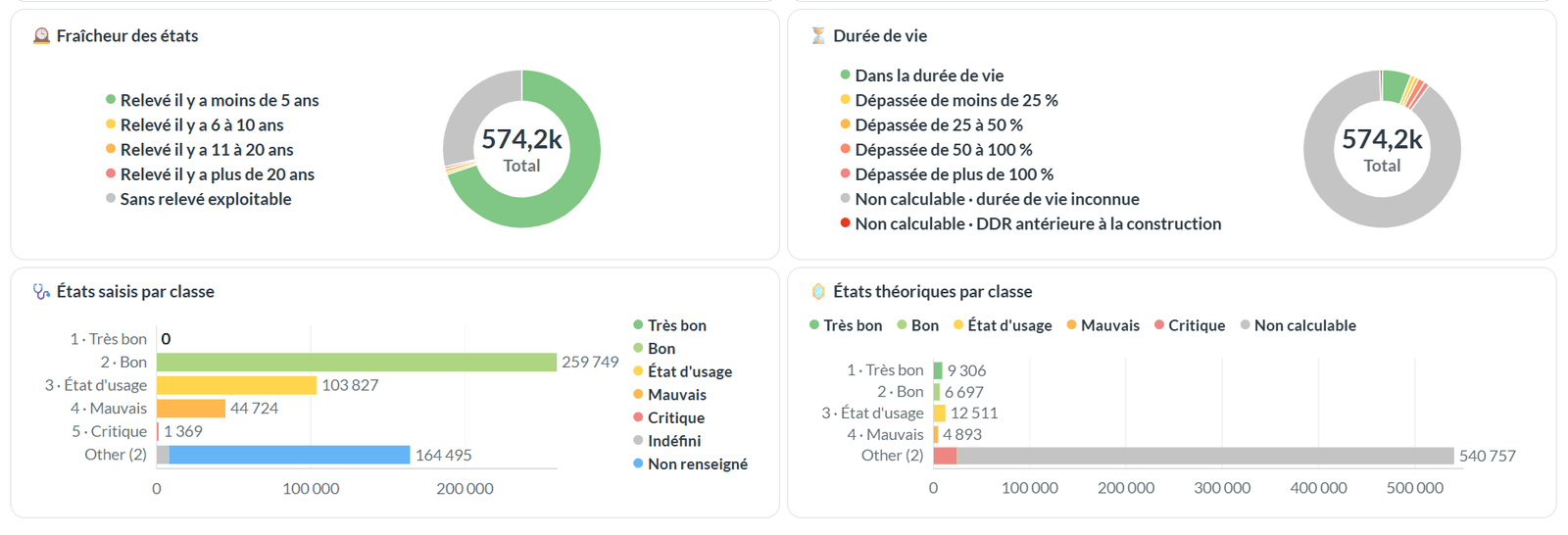
The share of conditions surveyed less than 5 years ago is often very low at first. It rises as the survey date is filled in during your visits and imports.
Dates: are they plausible?
- DDR par année et construction: your dated components, year by year, compared with the construction year of the building (or else of the property). A bar dominated by "égale à la construction" (equal to construction) almost always signals a date copied by default, not a real works date.
- DDR et construction: the same total, all years combined: date earlier than, equal to or later than construction, or construction date missing. A date earlier than construction is impossible.
- DDR par année et état: your dated components, coloured by general condition. It brings inconsistencies to light: equipment renewed recently but found in poor condition, or very old equipment declared in very good condition.
Correcting, rule by rule
The Comment corriger (how to correct) table, at the bottom of the tab, gives one rule per row with the number of components affected, the share of the portfolio, a severity and the action to take.
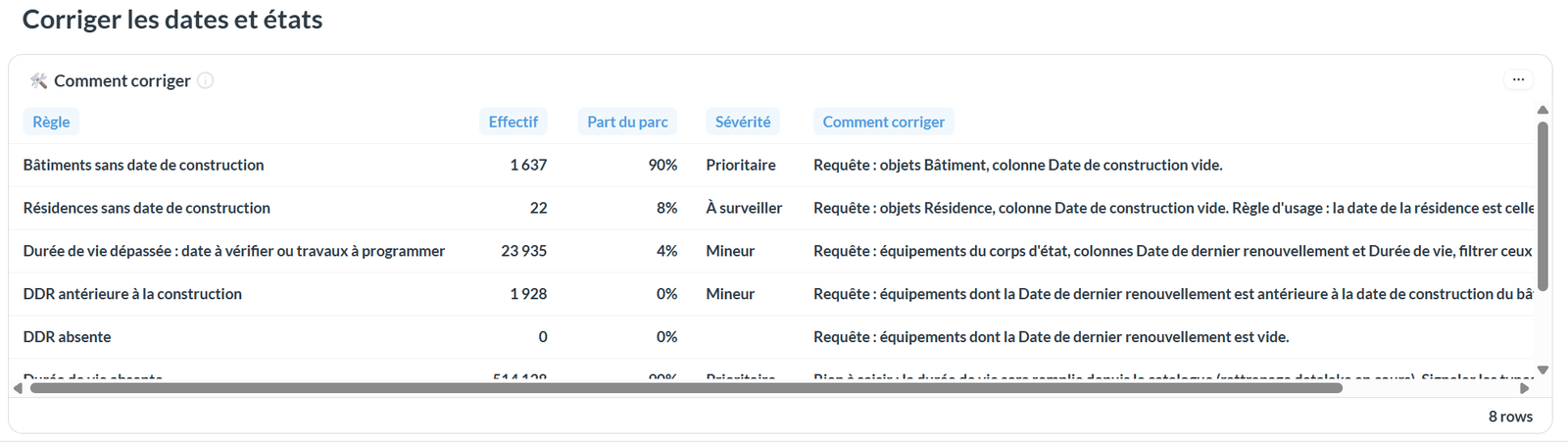
| Severity | Share of the portfolio affected |
|---|---|
| Prioritaire (priority) | 20% or more |
| À surveiller (to watch) | 5 to 20% |
| Mineur (minor) | less than 5% |
The first two rules concern buildings and properties and only follow the Résidence filter; the others concern the filtered components.
| Rule | What to do |
|---|---|
| Buildings without a construction date | In the query tool, start from buildings and display the Date de construction column: the empty rows are the ones to complete. |
| Properties without a construction date | Same query on properties. A property's date is that of its oldest building. |
| Lifespan exceeded | Query the equipment of the trade concerned with the Date de dernier renouvellement and Durée de vie columns. Check building by building: enter the real year if the equipment was replaced, otherwise schedule the works. |
| Date of last renewal earlier than construction | Query the equipment whose date of last renewal is earlier than the building's construction, and replace it at least with the construction year. |
| Date of last renewal missing | Query the equipment without a date of last renewal and complete it. |
| Lifespan missing | Nothing to enter on your side: the lifespan comes from the component type library. If a type has none, report it to your referent. |
| General condition missing | Query the equipment without a general condition. Survey it on site with EDIT (component › Attributes › general condition), or enter it in bulk from the query tool. |
| "Indéfini" condition | Query the equipment whose general condition is Indéfini. A large number of Indéfini usually comes from an import: correct the source, or else enter a real value. |
The report is recalculated every night. A correction made during the day only shows the next morning: there is no point reloading the page to check it.
See also
- Equipment dates and conditions — reading the portfolio overview and the two average conditions
- Reading wear — spotting the families and buildings to act on first
- Querying your data — building the query and correcting in bulk
- Running a site survey with EDIT — entering the general condition on site