Reading equipment wear by family and by building
Looking for something else? See Where to start.
What it is for
Tabs 3 and 4 of the Dates et états des équipements report use the same indicators, but row by row: one equipment family, one property, one building. This is where you decide where to act first.
How to get there
⚙️ Settings › Monitoring group › Dates et états des équipements › tab 3 · Vétusté par corps d'état or 4 · Vétusté par résidence et bâtiment.
Wear by trade
Three tables, from broadest to finest: Par corps d'état (by trade), Par famille d'équipement (by equipment family; for example, in heating and ventilation: terminal units, heat production, ventilation), then Par équipement (by equipment). Rows are grouped under their trade. The library code is shown in brackets after the label: it is what lets you find the right type in the query tool.
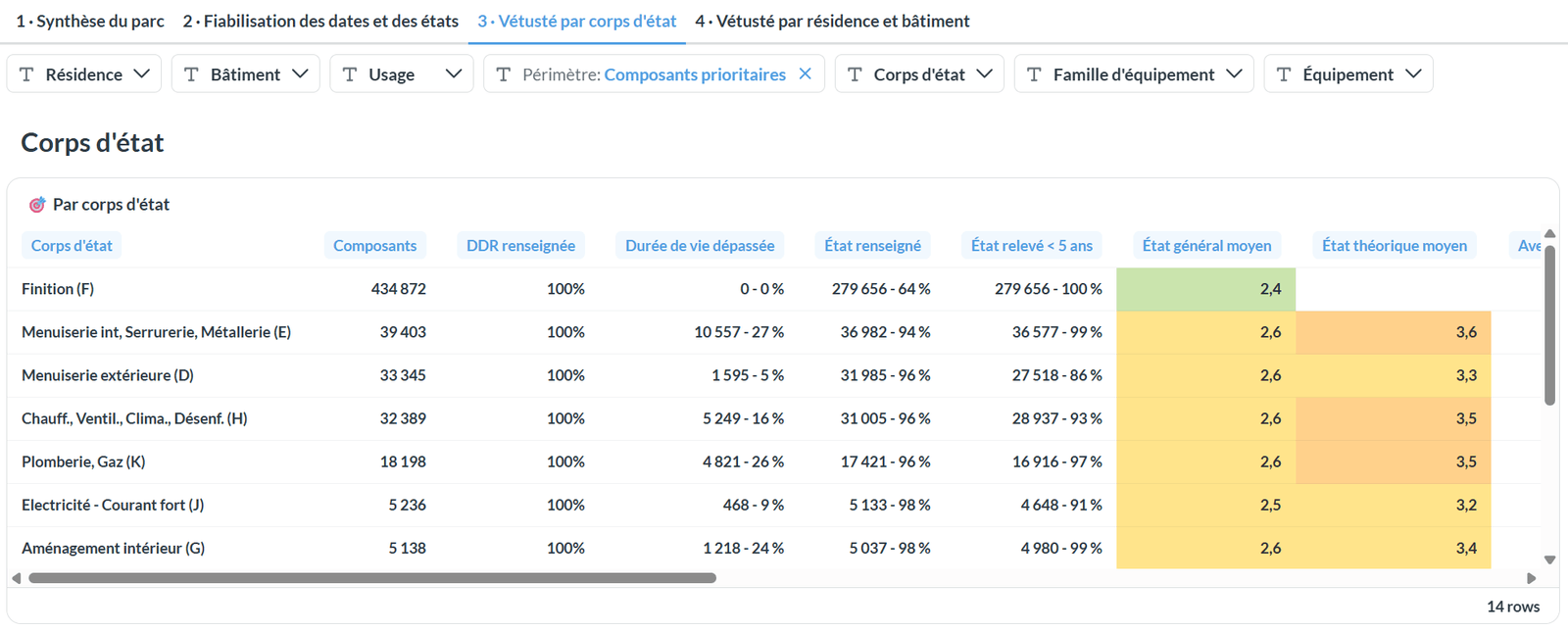
Each row gives:
| Column | What it tells you |
|---|---|
| Composants | the number of components in scope |
| DDR renseignée | how many have a date of last renewal |
| Durée de vie dépassée | among those with a date, how many have exceeded their lifespan |
| État renseigné | how many have a general conditionThe condition of a piece of equipment as observed during a survey: visit, diagnostic or import. (excluding Indéfini) |
| Relevé depuis moins de 5 ans | among those with a condition, how many were surveyed recently |
| État général moyen, état théorique moyen | on the scale from 1 very good to 5 critical |
| Mieux que l'âge | components whose observed condition is at least two classes better than the theoretical one: their date should be checked first |
| Lists of dates and conditions | the values present and their count; ★ marks the most frequent |
Shares are shown as "count - share". "<1%" means at least one component is affected.
A family where almost every date is the same, and equal to the construction year, has most likely never been dated: it is a copied date, to be corrected.
Finish coverings account for many components and can hide the other families. Remove them with the Corps d'état filter to read the rest.
Wear by property and building
Buildings to make reliable
The first table gives one row per building: construction date, last refurbishment, number of components, number of distinct dates, and the list of dates and conditions (★ the most frequent).
It is sorted to put first what needs correcting: buildings without a construction date first, then those whose most frequent date is equal to construction. When the building has no construction date, the site's date is shown instead, marked "absente" (missing).
Each building's name opens its record in the platform, where you can correct it.
By property
The Par résidence table uses the same reading as the trade table, property by property, sorted by number of components. Properties without components in scope come last.
Two charts complete the reading, each limited to the 40 properties most affected:
- État général par résidence: the breakdown of the conditions entered, properties with the highest share of poor and critical first;
- Durée de vie dépassée par résidence: the share within lifespan, exceeded by bracket, or not calculable, most exceeded properties first.
See also
- Equipment dates and conditions — the filters and the portfolio overview
- Making dates and conditions reliable — the correction to make for each anomaly
- The component type reference — the trades, families and codes of the library