Knowing whether you can trust the condition of your equipment
Looking for something else? See Where to start.
What it is for
A multi-year works plan is only as good as the data behind it: the date of last renewal of each piece of equipment and its general condition. If a date was copied by default, or a condition was never surveyed, the plan schedules works where none are needed, or misses them where they are.
This report shows your equipment and coverings from two angles that can be compared, then shows you what is left to make reliable and how to correct it:
- the general condition is what was observed during a survey (visit, diagnostic, import);
- the theoretical condition is the condition a component should be in given its age. It is calculated automatically from its date of last renewal and the lifespan expected for its type.
When the two agree, your dates are reliable and your portfolio is ageing normally. When they differ, that is where to look.
How to get there
⚙️ Settings in the sidebar › Monitoring group › Dates et états des équipements. If it does not appear in your menu, contact your referent.
The report is read-only: corrections are made in the platform; the report measures and tells you where to act.
The four tabs
| Tab | What it is for |
|---|---|
| 1 · Synthèse du parc (portfolio overview) | The picture of your portfolio: what it contains, the average observed condition, the average expected condition, the age of your components and where your data comes from. |
| 2 · Fiabilisation des dates et des états (making dates and conditions reliable) | What is left to correct, and which query to start with. See Making dates and conditions reliable. |
| 3 · Vétusté par corps d'état (wear by trade) | The same reading by trade, by equipment family, then by equipment. See Reading wear. |
| 4 · Vétusté par résidence et bâtiment (wear by property and building) | The buildings to make reliable first, then the reading property by property. See Reading wear. |
The filters
The filters at the top of the page apply to all four tabs.
| Filter | What it does |
|---|---|
| Résidence, Bâtiment, Usage | Narrow the reading to part of the portfolio. The building list follows the property and use you selected. |
| Périmètre | Composants prioritaires (priority components, the default) or Tous les composants (all components). Priority components are those whose date of last renewal and condition are expected first: major technical equipment, exterior doors and joinery, terminal units, building envelope, fittings. |
| Corps d'état, Famille d'équipement, Équipement | Go down from one level to the next in the component types: for example Roofing, then Flat roof covering. |
The report speaks most clearly at the scale of one property and one equipment family. If you know all your roofs were redone in 2018, a different date stands out immediately.
Reading the portfolio overview
What your portfolio contains
The Résidences and Bâtiments tiles count those that have components within the filters. Below them, three figures complete the reading: those without a construction date, those without components, and the total.
Equipment and coverings are counted separately. Coverings (wall, ceiling and floor finishes, facade coverings) are managed by surface, not by unit; they are all treated as priority components.
The average general condition
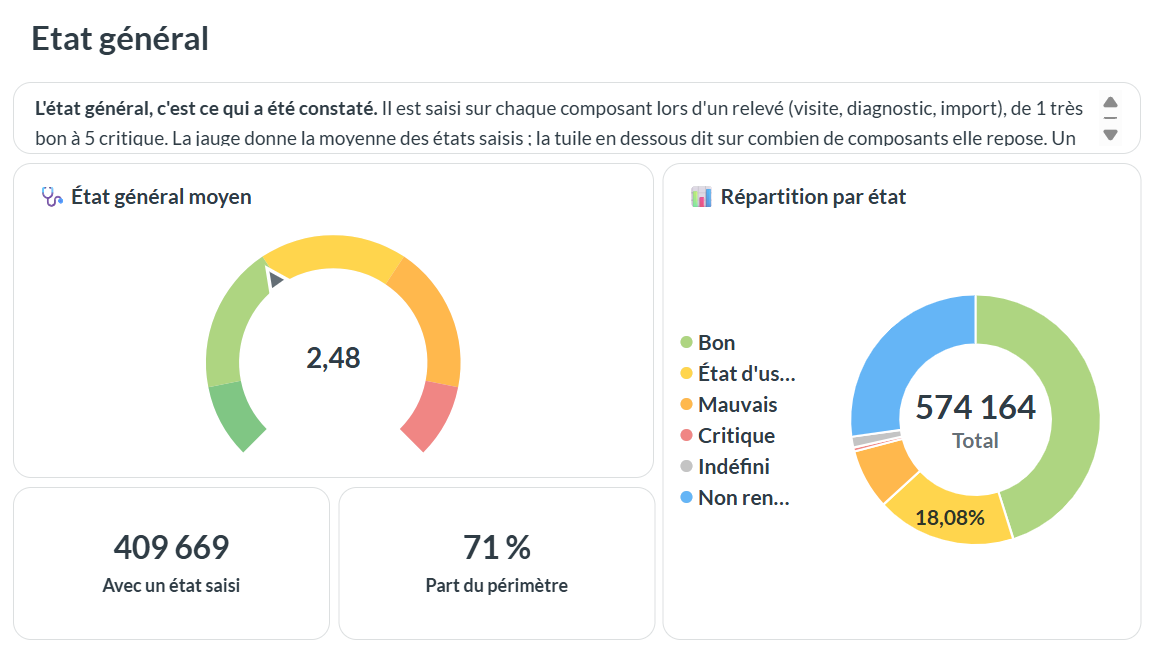
The gauge gives the average of the conditions entered, on the same scale as in the platform: very good 1, good 2, fair 3, poor 4, critical or dangerous 5. "Indéfini" (undefined) and empty conditions are not counted.
Always read the tile below it: it tells you how many components the average rests on, and what share of the scope that is. A portfolio that has seldom been surveyed gives an average that only represents the components that were seen.
The average theoretical condition
The theoretical condition depends on how much of the lifespan has been used since the last renewal:
| Lifespan used | Theoretical condition |
|---|---|
| less than 15% | 1 · Very good |
| 15 to 30% | 2 · Good |
| 30 to 70% | 3 · Fair |
| 70 to 90% | 4 · Poor |
| beyond, or lifespan exceeded | 5 · Critical |
It is only calculated for components whose date of last renewal and lifespan are both known. The Âge et durée de vie (age and lifespan) chart shows the others as not calculable: unknown lifespan, date earlier than construction, no date.
If the observed condition is much better than the theoretical one, either the component has been well maintained, or its renewal date is wrong: that is where to check. If it is worse, maintenance has not kept up.
Where the data comes from
The two tables Origine des états and Origine des DDR tell you where your values come from: entered by a user, modelling (digital model), file import, API or connector, or automatic association.
A date of last renewal whose origin is Association automatique is the construction date copied by the platform for lack of anything better: it is not a real works date.
Good to know
- Data is updated every night. A correction made in the platform shows in the report the next morning.
- Low figures do not mean the report is wrong. They often say the data is still missing: survey dates rarely filled in, unknown lifespans. Bringing that to light is exactly what the report is for.
See also
- Making dates and conditions reliable — what is left to correct, rule by rule
- Reading wear — by trade, by property and by building
- A building's equipment — where to find the date of last renewal and the general condition of a piece of equipment
- Building a multi-year works plan — what this data feeds