The Compliance report
What it is for
This report tracks the compliance of your mandatory surveys by five families: EPC, asbestos, lead, gas and electricity.
It answers three questions: where do I stand, where are my risks, what must I plan.
What the report contains depends on what was agreed with your organisation: some tabs may not appear for you.
The screen explained
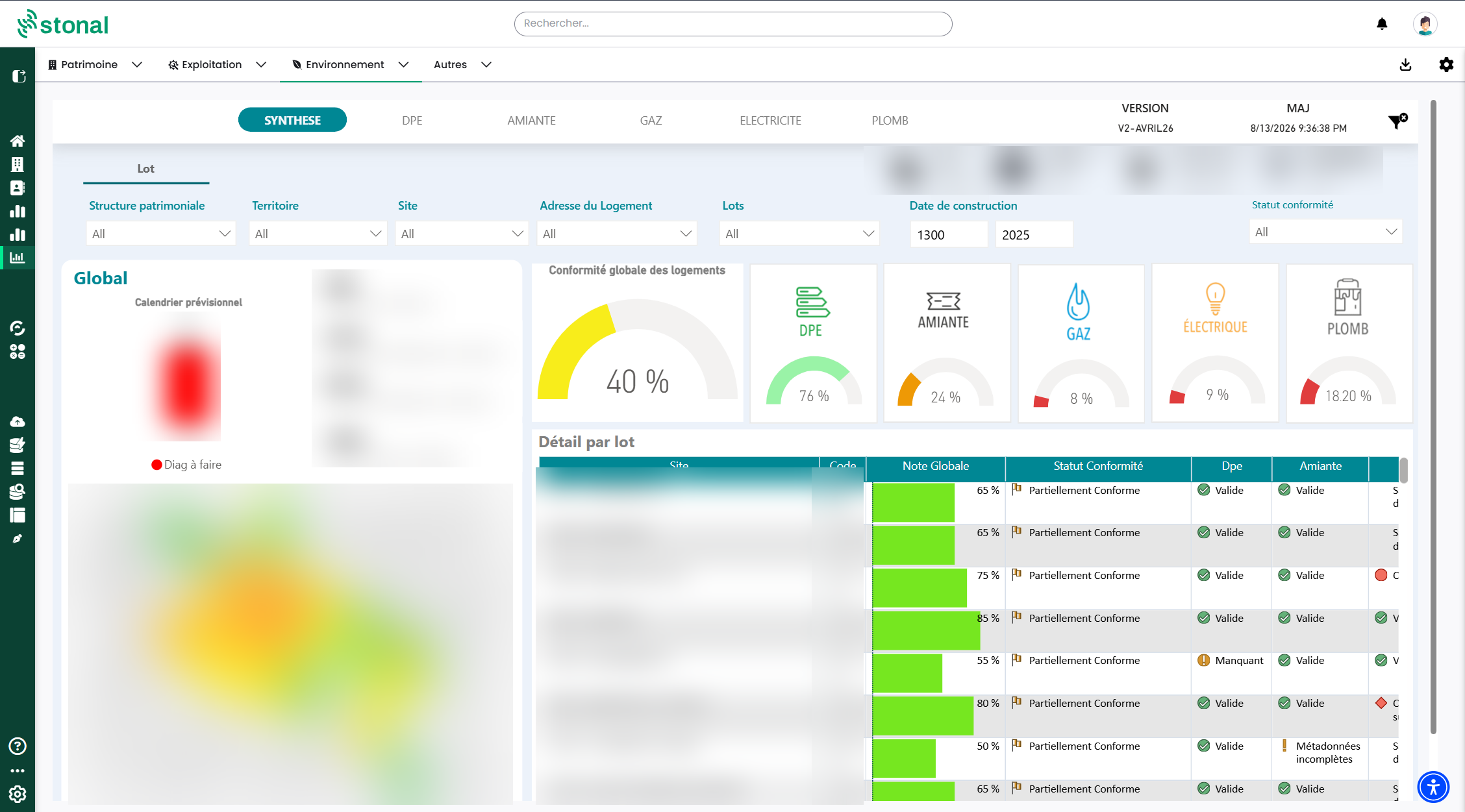
The tabs are reachable from the top of the Summary page: Summary, EPC, Asbestos, Gas, Electricity, Lead. Each survey tab has an "Unassigned survey" sub-tab.
A fixed banner appears on every page: branches, estates or properties, dwellings, habitable area, and the report's last update date. An icon lets you clear all filters at once.
Its figures deliberately remain those of your whole portfolio, to stay consistent with the cover page.
The filters
Branches, Territory (department then town), estate or site, dwelling address, units (code and name), construction date. On the Summary, compliance status is added.
A "Portfolio structure" filter exists: it ships empty and is configured for your organisation.
How compliance is calculated
Each survey is scored according to its status:
| Survey status | Score |
|---|---|
| Valid | 100% |
| Not applicable | 100% |
| Expiring this year | 75% |
| Expired | 50% |
| Incomplete metadata | 25% |
| Missing | 0% |
A dwelling's overall score is the average of its five survey scores.
The compliance status follows from it:
| Overall score | Status |
|---|---|
| 100% | Compliant |
| Above 50% | Weakly compliant |
| 50% or below | Partially compliant |
| 0% | Non-compliant |
Why some dwellings are "not applicable"
The regulations do not apply to your whole portfolio. The report works out what is required from the construction date:
| Survey | Not applicable when |
|---|---|
| Asbestos | The building was built after 1997 |
| Lead | The building was built after 1949 |
| Gas and electricity | The dwelling is less than 15 years old |
A recent portfolio therefore shows a lot of "not applicable", and that is normal: those dwellings carry no regulatory risk.
That is what pulls the compliance rate up on a recent portfolio. To decide what to do, rely on the counters — dwellings with no survey, expired surveys — and on the detailed table, rather than on the rate on its own.
The forecast schedule
The report tells you when to act:
| Situation | What is planned |
|---|---|
| Survey missing | Survey to carry out, in the current year |
| Survey expired | Survey to redo, in the current year |
| Expiring this year | Current year + 1 |
| Valid | At its validity date |
The Summary tab
You will find the overall compliance of your dwellings, compliance by survey type, the forecast schedule, a map where your estates are coloured by status, and an exportable "Detail by unit" table.
What to know for each survey
EPC
- Two levels: by dwelling, the default view, and by building.
- The rating shown, A to G, is the least favourable of the energy rating and the climate rating (greenhouse gases). A dwelling rated C on energy but E on greenhouse gases appears as E.
- The table opens the document held in Stonal, and the official certificate on the ADEME website through its ADEME number.
- Individual houses are followed in the dwelling view, not in the building view.
Asbestos
Three documents are tracked, and they do not have the same grain:
| Document | What it covers | Grain |
|---|---|---|
| DAPP | The private areas of a dwelling | Dwelling |
| RAAT | A survey carried out before works | Dwelling, and separately the building for common areas |
| DTA | The building's asbestos technical file | Building |
RAATs have no regulatory validity date: the report simply says whether they are there, and whether asbestos was found. Where asbestos is found, a three-year control date is calculated automatically.
It has to be attached to each of them in your document management, otherwise the buildings left out come up as missing.
Gas
- Concerns dwellings over 15 years old.
- The report tracks both the gas surveys and the conformity certificates issued after works.
- Where an anomaly is found, a six-year control date is calculated.
Electricity
- Concerns dwellings over 15 years old.
- A Consuel certificate less than six years old counts as compliant and removes the need for a survey.
- Otherwise the electrical survey is valid for six years.
Lead
- Concerns buildings built before 1949.
- The document tracked is the CREP. Where lead is found, a six-year control date is calculated; where none is found, the report stays valid with no time limit.
- CREPs covering common areas are attached to the building.
Unassigned surveys: the tab to watch
Every survey tab holds an "Unassigned survey" page. It lists the documents present in Stonal that could not be attached to a specific dwelling or building — an ambiguous file name, a code that could not be found.
Why it matters: an unassigned survey shows up as Missing everywhere else, even though the document exists.
Look at this page regularly and have the filing corrected. Your compliance rate improves without a single new survey being carried out.
Good to know
The report pages only keep residential dwellings, and only buildings or sites holding at least one are taken into account.
See also
- The documents of a property — where to file your surveys
- The Document tracking report