Searching data
This guide explains how to fetch the right kind of data depending on your usage, by using the Stonal search API with filters, pagination, and advanced search patterns.
You will need to get a personal access token to use the search API.
Getting started
Authentication
Here is a sample request around the search API, where we will fetch BUILDING_GROUPs and BUILDINGs.
You need to pass a query with something like that:
#!/bin/sh -ex

# Your organization
STONAL_ORG=DEMO

# Fetch your token from here: https://app.stonal.io/users/app
STONAL_TOKEN=9631e269-e21e-4ce6-92a9-c6f7ed1fa98a

curl \
  https://api.stonal.io/datalake/v1/organizations/$STONAL_ORG/assets/search \
  -v \
  -X POST \
  -H 'Content-Type: application/json' \
  -H "Authorization: Bearer $STONAL_TOKEN" \
  -d @query.json -o output.json
Initial query
{
    "search": {
        "type": {
            "equals": [
                "BUILDING",
                "BUILDING_GROUP"
            ]
        }
    },
    "properties": {
      "simple": ["LAT", "LNG"]
    },
    "fields": [
        "name",
        "type",
        "uid",
        "externalIds"
    ],
    "paginate": {
        "size": 2
    }
}
The output will be similar to this:
{
    "assets": [
        {
            "uid": "f6472f1a-9473-4fbf-9e1c-1c063eebb430",
            "name": "Building Group 1",
            "type": "BUILDING_GROUP",
            "externalIds": {
                "SOURCE_NAME": "BG001"
            },
            "properties": {
                "simple": {
                    "LAT": "46.800",
                    "LNG": "1.6959"
                }
            }
        },
        {
            "uid": "b81ce341-86f0-4cfe-a806-1d4a0f9a12ed",
            "name": "Building 1",
            "type": "BUILDING",
            "externalIds": {
                "SOURCE_NAME": "B001"
            },
            "properties": {
                "simple": {
                    "LAT": "46.500",
                    "LNG": "1.7959"
                }
            }
        }
    ],
    "paginate": {
        "size": 2,
        "cursor": "123456"
    }
}
Subsequent queries
Then to fetch the next batch of 10 assets, you shall issue the same query with the paginate.cursor set to
the received value, ie "123456".
{
    "search": {
        "type": {
            "equals": [
                "BUILDING",
                "BUILDING_GROUP"
            ]
        }
    },
    "fields": [
        "name",
        "type",
        "uid",
        "externalIds",
        "parent"
    ],
    "paginate": {
        "size": 2,
        "cursor": "123456"
    }
}
The output will be similar to this:
{
    "assets": [
        {
            "uid": "dd127caf-5b9b-4116-884e-b42505ac1bd6",
            "name": "Building Group 2",
            "type": "BUILDING_GROUP",
            "externalIds": {
                "CODE": "BG002"
            }
        },
        {
            "uid": "2c2ca7be-78f1-4734-a4c6-bbc773c9027b",
            "name": "Building 2",
            "type": "BUILDING",
            "externalIds": {
                "CODE": "B002"
            },
            "parent": {
                "uid": "dd127caf-5b9b-4116-884e-b42505ac1bd6"
            }
        }
    ],
    "paginate": {
        "size": 2,
        "cursor": "234567"
    }
}
Going further
There are many other ways to query data. And you can mix any of these filters.
Searching by external IDs
You can search using a single external ID, either from the asset itself or from its relations.
Searching a specific asset by one of its external IDs.
"search": {
    "asset": {
        "externalIds": {
          "SOURCE_NAME": "BG001"
        }
    }
}
Searching assets whose parent matches the given external ID.
"search": {
    "parent": {
        "externalIds": {
          "SOURCE_NAME": "BG001"
        }
    }
}
Navigating the hierarchy
Assets are organized in a hierarchy (see Assets hierarchy). You can use the following relation filters to navigate up and down the tree. Only one relation filter can be used per request.
Find direct children of a parent
Use parent to find all assets that are direct children of a given parent asset.
"search": {
    "parent": { "uid": "dd127caf-5b9b-4116-884e-b42505ac1bd6" }
}
Find all descendants of an ancestor
Use parentRecursive to find all assets nested under a given ancestor at any depth.
"search": {
    "parentRecursive": { "externalIds": { "CODE": "SITE_001" } }
}
Find direct parents of a child
Use child to find assets that are direct parents of a given child asset.
"search": {
    "child": { "uid": "b81ce341-86f0-4cfe-a806-1d4a0f9a12ed" }
}
Find all ancestors of a descendant
Use childRecursive to find all ancestor assets of a given descendant at any depth. This is useful for walking up the hierarchy from a leaf asset (e.g. equipment) to find its building, building group, etc.
{
    "search": {
        "childRecursive": { "uid": "$equipmentUid" },
        "type": { "equals": ["BUILDING", "BUILDING_SECTION"] }
    },
    "fields": ["name", "type"],
    "paginate": { "size": 10 }
}
You can also use externalIds to identify the descendant:
"search": {
    "childRecursive": {
        "externalIds": { "TRIRIGA": "EQP1008473" }
    }
}
childRecursive returns all ancestors but excludes the queried child asset itself from the results. All other filters (type, name, fields, properties, paginate) apply normally on the returned ancestors.
Matching on a pattern
You can search for types matching a regex pattern.
Searching for spaces
SPACE is another name for rooms in the Stonal platform.
This will return assets of SPACE and SPACE|* types:
"search": {
    "type": {
        "matches": [
            "SPACE",
            "SPACE\\|.*"
        ]
    }
}
Please note that this will apply to all spaces within the organization. If you want to limit it to a particular building, you should combine it with a parent filter like this:
"search": {
    "type": {
        "matches": [
            "SPACE",
            "SPACE\\|.*"
        ]
    },
    "parent": {
        "externalIds": {
            "SOURCE_NAME": "BG001"
        }
    }
}
Excluding by type
Only one of notMatches or notEquals is accepted (same as matches & equals)
By matching on a pattern
Exclude specified equipments (those having a type starting by EQUIPMENT|C|CA|) when listing equipments in a building group
"search": {
    "type": {
        "matches": ["EQUIPMENT\\|.*"],
        "notMatches": ["EQUIPMENT\\|C\\|CA\\|.*"]
    },
    "parentRecursive": {
      "externalIds": { "CODE": "SITE_001" }
    }
}
By strict equality
Exclude specified equipments (those having a type equals to EQUIPMENT|C|CA|CA01 or EQUIPMENT|A|AA) when listing equipments in a building group
"search": {
    "type": {
        "matches": ["EQUIPMENT\\|.*"],
        "notEquals": ["EQUIPMENT|C|CA|CA01", "EQUIPMENT|A|AA"]
    },
    "parentRecursive": {
      "externalIds": { "CODE": "SITE_001" }
    }
}
Filtering on a property's current data
Assets carry properties: data points like address, rental area, construction date, or number of tenants. Each property is identified by a code (e.g. ADDRESS, RENTAL_AREA, BUILDING_DATE, TENANT_COUNT).
Property codes for each asset type are listed in the DQC product. See Fetch a subset of properties for details.
Add a search.properties block to filter assets by their property values.
search.properties filters which assets are returned. The root-level properties controls which data appears in the response. They can be used together.
Example: buildings in 8th arrondissement of Paris with more than 2 tenants
{
  "search": {
    "properties": {
      "conditions": [
        { "op": "gt", "property": "TENANT_COUNT", "value": "2" },
        { "op": "contains", "property": "ADDRESS", "value": "75008 Paris" }
      ]
    },
    "type": {
      "equals": ["BUILDING"]
    }
  },
  "fields": ["uid", "name", "type"],
  "properties": {
    "simple": ["TENANT_COUNT", "ADDRESS"]
  },
  "paginate": { "size": 50 }
}
Condition structure
A condition is an object with the following fields:
| Field | Description |
|---|---|
op | The operator to apply (see Operators below) |
property | The property code to filter on (for leaf conditions) |
value | The value to compare against (for single-value operators) |
values | A list of values to compare against (for in/notIn operators) |
conditions | A list of nested conditions (for and/or group operators) |
Multiple conditions at root level are combined with AND. Use or/and groups for explicit logic:
{ "op": "or", "conditions": [
  { "op": "contains", "property": "ADDRESS", "value": "75008 Paris" },
  { "op": "gt", "property": "TENANT_COUNT", "value": "10" }
]}
Groups can be nested:
{
  "conditions": [
    { "op": "eq", "property": "MAIN_ASSET_NATURE", "value": "Bureau" },
    { "op": "or", "conditions": [
      { "op": "gt", "property": "RENTAL_AREA", "value": "500" },
      { "op": "gt", "property": "TENANT_COUNT", "value": "10" }
    ]}
  ]
}
Operators
Comparison
Text comparisons are case and accent insensitive ("chatelet" matches "Châtelet").
| Operator | Description | Required fields |
|---|---|---|
eq | Equals | value |
neq | Not equals | value |
in | Matches any value in a list | values (non-empty) |
notIn | Matches none of the values | values (non-empty) |
{ "op": "eq", "property": "MAIN_ASSET_NATURE", "value": "Bureau" }
{ "op": "in", "property": "MAIN_ASSET_NATURE", "values": ["Commerce", "Logement"] }
Text
| Operator | Description | Required fields |
|---|---|---|
contains | Substring match (case/accent insensitive) | value |
notContains | Excludes substring match | value |
regex | Regular expression match | value (valid regex) |
notRegex | Excludes regex match | value (valid regex) |
{ "op": "contains", "property": "ADDRESS", "value": "Rue du chat" }
Numeric and date
All values are passed as strings but must be a valid number (e.g. "100") or ISO 8601 date (e.g. "2024-01-15").
| Operator | Description | Required fields |
|---|---|---|
gt | Greater than | value (number or date) |
gte | Greater than or equal | value (number or date) |
lt | Less than | value (number or date) |
lte | Less than or equal | value (number or date) |
{
  "conditions": [
    { "op": "gte", "property": "RENTAL_AREA", "value": "100" },
    { "op": "lte", "property": "RENTAL_AREA", "value": "500" }
  ]
}
{ "op": "gt", "property": "BUILDING_DATE", "value": "2000-01-01" }
Presence
| Operator | Description | Required fields |
|---|---|---|
isNull | No current value for this property | none (value/values must be absent) |
isNotNull | Has a current value | none (value/values must be absent) |
{ "op": "isNull", "property": "ADDRESS" }
Logic groups
| Operator | Description | Required fields |
|---|---|---|
and | All nested conditions must match | conditions (at least 2) |
or | At least one must match | conditions (at least 2) |
Negation and missing data
Negation operators (neq, notIn, notContains, notRegex) exclude assets that have no value for the property. To include them, combine with isNull:
{ "op": "or", "conditions": [
  { "op": "notIn", "property": "MAIN_ASSET_NATURE", "values": ["Commerce", "Parking"] },
  { "op": "isNull", "property": "MAIN_ASSET_NATURE" }
]}
Fetch a subset of fields
Fields are attributes directly associated with an asset. You can specify which fields to retrieve.
Allowed values: uid, name, updatedAt, deletedAt, type, externalIds, representations, parent
Unique identifier uid is always returned.
{
  "search": {
    "asset": { "uid": "2cb3683a-90f6-48de-aaa0-08f45c7bf808" }
  },
  "fields": ["name", "updatedAt", "externalIds"]
}
Fetch a subset of properties
Properties are associated with time-series data linked to an asset.
You can fetch the reference data for a specified property at the current time.
Items of simple list are referring to property’s code.
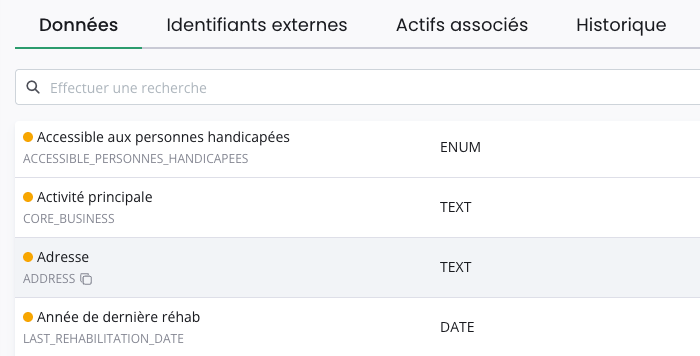
This code can be found in our DQC product for each asset's type
In this example we are on an BUILDING, its property named Adresse has ADDRESS for code.
Screenshoot from DQC on a URL like https://app.stonal.io/dqc/$ORGANIZATION_CODE/asset-types/EQUIPMENT/assets/$ASSET_UID
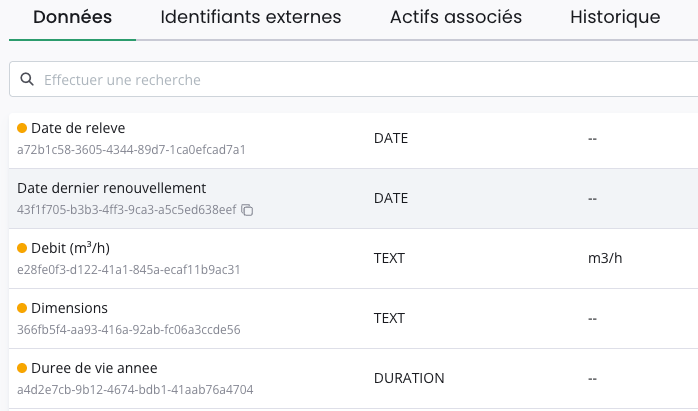
Nb: code can also have uuid format
In this example we are on an EQUIPMENT, its property named Date dernier renouvellement has 43f1f705-b3b3-4ff3-9ca3-a5c5ed638eef for code.
Screenshoot from DQC on a URL like https://app.stonal.io/dqc/$ORGANIZATION_CODE/asset-types/EQUIPMENT/assets/$ASSET_UID
{
  "search": {
    "type": { "equals":  ["BUILDING"] }
  },
  "properties": {
    "simple": ["ADDRESS", "BUILDING_DATE"]
  }
}
{
  "assets": [
    {
      "uid": "1321987a-b94f-4180-ab93-94432be0855f",
      "properties": {
        "simple": {
          "ADDRESS": "28 Cr Albert 1er, 75008 Paris",
          "BUILDING_DATE": "2001-09-29"
        }
      }
    }
  ]
}
Differential update
You can search data that has been updated since a particular date.
"search": {
    "updatedAtAfter": "2025-09-12T00:00:00"
}
Detect deleted assets
In search response, you can also include deleted assets matching specified filters.
"search": {
    "updatedAtAfter": "2025-09-12T00:00:00",
    "includeDeleted": true
}
Asset pictures
This mostly applies to BUILDING_GROUP and BUILDING assets.
If the asset has a PHOTO_ID, we can access it directly using this pattern of URL:
https://api.stonal.io/document-storage/v1/organizations/$org/documents/$photoId/content
We also provide a resizing and thumbnail generation for picture using imagor so that you can use it direclty in your frontend API:
https://cdn-api.stonal.io/imagor/unsafe/fit-in/200x/api.stonal.io/document-storage/v1/organizations/$org/documents/$photoId/content
The unsafe in the URL means you don't require to sign the URL but it is safe to use.