Ingesting data
This guide explains how to ingest and manage assets like buildings, spaces, and equipment using the Stonal ingestion API.
You will need to get a personal access token to use the ingestion APIs.
All ingestion requests use the ingestion API with the following structure:
#!/bin/sh -ex

# Your organization
STONAL_ORG=DEMO

# Fetch your token from here: https://app.stonal.io/users/app
STONAL_TOKEN=9631e269-e21e-4ce6-92a9-c6f7ed1fa98a

curl \
  https://api.stonal.io/datalake/v1/organizations/$STONAL_ORG/assets \
  -v \
  -X POST \
  -H 'Content-Type: application/json' \
  -H "Authorization: Bearer $STONAL_TOKEN" \
  -d @payload.json
Root level assets
BUILDING_GROUP, BUILDING
These are the top-level assets in your hierarchy. A BUILDING_GROUP represents a site containing multiple buildings, and BUILDING represents a logical building as managed in your ERP.
{
  "assets": [
    {
      "externalIds": {
        "CODE": "SITE_001"
      },
      "type": "BUILDING_GROUP",
      "name": "Residence du Parc",
      "properties": {
        "simple": {
          "ADDRESS": "123 Rue de la Paix, Paris, France"
        }
      }
    },
    {
      "externalIds": {
        "CODE": "SITE_001_BAT_001"
      },
      "type": "BUILDING",
      "name": "Bâtiment A",
      "parent": {
        "externalIds": {
          "CODE": "SITE_001"
        }
      }
    }
  ]
}
Building and Level Sections
BUILDING_SECTION, LEVEL_SECTION
Building and level sections provide logical divisions within your building structure. A BUILDING_SECTION represents a section of a building (such as a stairwell, entrance, or wing), while a LEVEL_SECTION represents a vertical division within a floor.
{
  "assets": [
    {
      "externalIds": {
        "CODE": "SITE_001_ENTRANCE_A"
      },
      "type": "BUILDING_SECTION",
      "name": "Entrée A",
      "parent": {
        "externalIds": {
          "CODE": "SITE_001_BAT_001"
        }
      }
    },
    {
      "externalIds": {
        "CODE": "SITE_001_LEVEL_RDC_SECTION_A"
      },
      "type": "LEVEL_SECTION",
      "name": "Section A - RDC",
      "parent": {
        "externalIds": {
          "CODE": "SITE_001_LEVEL_RDC"
        }
      },
      "groupedBy": [
        {
          "externalIds": {
            "CODE": "SITE_001_ENTRANCE_A"
          }
        }
      ]
    }
  ]
}
The groupedBy field on a LEVEL_SECTION can link it to a BUILDING_SECTION, allowing you to associate floor sections with their corresponding building sections (e.g., stairwells or entrances that span multiple floors).
Physical building structure
PLAN|INDOOR, LEVEL, SPACE
Physical assets describe the actual geometry of your buildings. A PLAN|INDOOR groups multiple floors, a LEVEL represents a single floor, and SPACE represents rooms.
{
  "assets": [
    {
      "externalIds": {
        "CODE": "SITE_001_INDOOR_001"
      },
      "type": "PLAN|INDOOR",
      "name": "Plan Bâtiment A",
      "parent": {
        "externalIds": {
          "CODE": "SITE_001"
        }
      },
      "groupedBy": [
        {
          "externalIds": {
            "CODE": "SITE_001_BAT_001"
          }
        }
      ]
    },
    {
      "externalIds": {
        "CODE": "SITE_001_LEVEL_RDC"
      },
      "type": "LEVEL",
      "name": "Rez-de-chaussée",
      "parent": {
        "externalIds": {
          "CODE": "SITE_001_INDOOR_001"
        }
      }
    },
    {
      "externalIds": {
        "CODE": "SITE_001_SPACE_001"
      },
      "type": "SPACE",
      "name": "Bureau 101",
      "parent": {
        "externalIds": {
          "CODE": "SITE_001_LEVEL_RDC"
        }
      },
      "groupedBy": [
        {
          "externalIds": {
            "CODE": "SITE_001_ZONE_001"
          }
        }
      ]
    }
  ]
}
The groupedBy field on a PLAN|INDOOR links it to a logical BUILDING. This allows you to associate physical plans with your ERP's building structure.
Logical assets
RENTED_UNIT, ZONE
Logical assets organize spaces for business purposes. A RENTED_UNIT represents a housing unit that can be rented (linked to contracts), and a ZONE groups multiple spaces together (an apartment, a set of offices, etc.).
{
  "assets": [
    {
      "externalIds": {
        "CODE": "SITE_001_APT_101"
      },
      "type": "RENTED_UNIT",
      "name": "Appartement 101",
      "parent": {
        "externalIds": {
          "CODE": "SITE_001_BAT_001"
        }
      }
    },
    {
      "externalIds": {
        "CODE": "SITE_001_ZONE_001"
      },
      "type": "ZONE",
      "name": "Appartement T3",
      "parent": {
        "externalIds": {
          "CODE": "SITE_001_LEVEL_RDC"
        }
      },
      "groupedBy": [
        {
          "externalIds": {
            "CODE": "SITE_001_APT_101"
          }
        }
      ]
    }
  ]
}
The groupedBy field on a ZONE links it to a RENTED_UNIT, allowing you to associate physical spaces with rentable units and their contracts.
Equipments and Openings
EQUIPMENT, OPENING
Openings represent doors, windows, and other passages within a space. Equipments are items installed in openings (doors, windows) or directly in spaces (radiators, etc.).
{
  "assets": [
    {
      "externalIds": {
        "CODE": "SITE_001_OPENING_001"
      },
      "type": "OPENING",
      "name": "Porte entrée Bureau 101",
      "parent": {
        "externalIds": {
          "CODE": "SITE_001_SPACE_001"
        }
      }
    },
    {
      "externalIds": {
        "CODE": "SITE_001_DOOR_001"
      },
      "type": "EQUIPMENT",
      "name": "Porte bois",
      "parent": {
        "externalIds": {
          "CODE": "SITE_001_OPENING_001"
        }
      }
    }
  ]
}
Response format
A successful ingestion returns the created/updated assets with their generated uid:
{
  "assets": [
    {
      "uid": "272e9b9c-31f1-4a6b-86af-a8737031a2bc",
      "externalIds": {
        "CODE": "SITE_001"
      },
      "type": "BUILDING_GROUP",
      "name": "Residence du Parc",
      "properties": {
        "source": "DEFAULT",
        "simple": {
          "ADDRESS": "123 Rue de la Paix, Paris, France"
        }
      }
    }
  ]
}
Uses cases
Updating an asset
We can refer to an asset using: uid or one externalIds. Same when referring to relations: parent, groups, groupedByor groupingAssetsToAdd
Updating asset's parent
Here we’re simply changing the parent of an asset
{
  "assets": [{
    "uid": "1712974c-3758-4e67-8717-1aa2441efc29",
    "parent": { "uid": "d3e98110-e494-4cac-a508-38058681fa62" }
  }]
}
For removing a parent, we need to explicitly set it to null
{
  "assets": [{
    "uid": "1712974c-3758-4e67-8717-1aa2441efc29",
    "parent": null
  }]
}
Adding or changing asset's externalId
When we want to change an external identifier, we need to specify the asset's uid.
{
  "assets": [{
    "uid": "1712974c-3758-4e67-8717-1aa2441efc29",
    "externalIds": {
      "CODE": "SITE_001",
      "PIH": "00001"
    }
  }]
}
Updating asset's expiration date
{
  "assets": [{
    "uid": "1712974c-3758-4e67-8717-1aa2441efc29",
    "expirationDate": "2040-10-09"
  }]
}
Updating asset's effective date
{
  "assets": [{
    "uid": "1712974c-3758-4e67-8717-1aa2441efc29",
    "effectiveDate": "2010-01-01"
  }]
}
Declaring properties for a building
Data declaration can be done while creating an asset or can be done later when updating an asset.
Automatically set effectiveDate to current date and expirationDate to max system date
Keys of simple object are referring to property’s code.
This code can be found in our DQC product for each asset's type
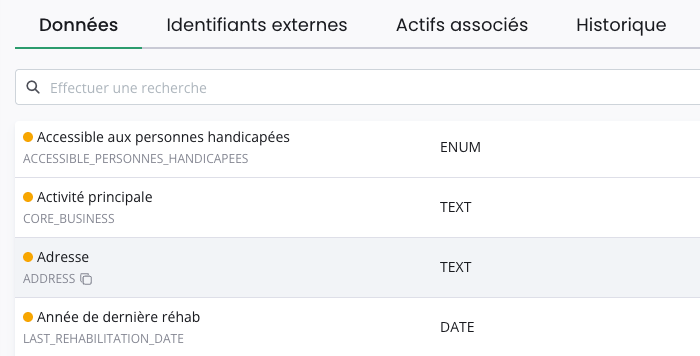
In this example we are on an BUILDING, its property named Adresse has ADDRESS for code.
Screenshoot from DQC on a URL like https://app.stonal.io/dqc/$ORGANIZATION_CODE/asset-types/EQUIPMENT/assets/$ASSET_UID
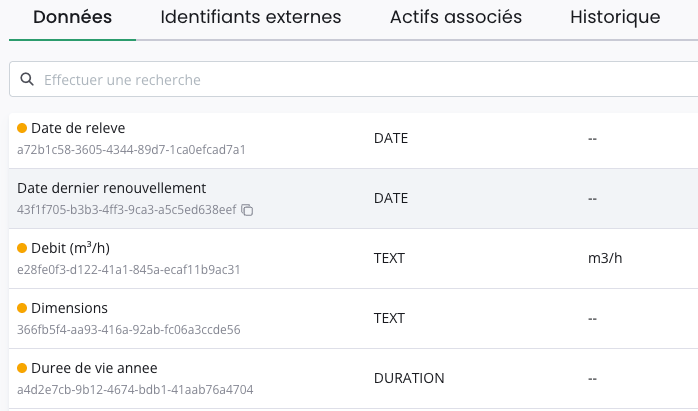
Nb: code can also have uuid format
In this example we are on an EQUIPMENT, its property named Date dernier renouvellement has 43f1f705-b3b3-4ff3-9ca3-a5c5ed638eef for code.
Screenshoot from DQC on a URL like https://app.stonal.io/dqc/$ORGANIZATION_CODE/asset-types/EQUIPMENT/assets/$ASSET_UID
{
  "assets": [{
    "externalIds": {
      "CODE": "BUILDING_001"
    },
    "properties": {
      "source": "PREMIANCE", // Optionnal - by default it's set to "DEFAULT"
      "simple": {
        "ADDRESS": "28, cours Albert 1er, 75008 PARIS, France",
        "BUILDING_DATE": "2025-11-25"
      }
    }
  }]
}
Ignoring unknown properties
If we want to ignore unknown properties and create existing ones (instead of throwing and stopping ingestion) we can set ignoreUnknowns parameter to true in options
{
  "options": {
    "properties": {
      "ignoreUnknowns": true
    }
  },
  "assets": [
    {
      "uid": "2009d42d-0f31-4c0f-a395-b7688e3b667d",
      "properties": {
        "source": "PREMIANCE",
        "simple": {
          "NON_EXISTING": "A value", // Will be ignored
          "ADDRESS": "28, cours Albert 1er, 75008 PARIS, FRANCE", // Will be created because this property exists
        }
      }
    }
  ]
}
The unknown properties will be ignored and not inserted and consequently not returned
{
  "assets": [
    {
      "uid": "2009d42d-0f31-4c0f-a395-b7688e3b667d",
      "externalIds": {
        "CODE": "BUILDING_001"
      },
      "type": "BUILDING",
      "name": "Bâtiment 1",
      "properties": {
        "source": "PREMIANCE",
        "simple": {
          "ADDRESS": "28, cours Albert 1er, 75008 PARIS, FRANCE"
        }
      }
    }
  ]
}
Expiring a property value
Sending a simple property mapped to null expires its current value on the asset (its expirationDate is set to today). Other properties sent in the same request are created or updated as usual.
This is the same null convention already used to remove a parent or an externalId.
{
  "assets": [{
    "externalIds": {
      "CODE": "BUILDING_001"
    },
    "properties": {
      "simple": {
        "ADDRESS": "28, cours Albert 1er, 75008 PARIS, France", // Created / updated as usual
        "BUILDING_DATE": null // Expires the current BUILDING_DATE value
      }
    }
  }]
}
- A property key absent from
simplemeans "no change"; a key present withnullmeans "expire". - Sending an empty string (
"") is rejected with a validation error. - If the property has no current value, the
nullis silently ignored (any future-dated value is left untouched). - An expired property is not returned in the response, since it no longer has a current value. Sending a value again re-activates it.
Declaring time-based properties
If not specified, automatically set startDate to current date and endDate to max system date
{
  "assets": [{
    "externalIds": {
      "CODE": "BUILDING_001"
    },
    "properties": {
      "precise": {
        "TENANT_NAME": [
          {
            "rawValue": "Laboratoire A",
            "endDate": "2029-01-31"
          },
          {
            "rawValue": "Avocats B",
            "startDate": "2029-02-01",
            "endDate": "2035-01-01"
          }
        ]
      }
    }
  }]
}
Deleting an asset
Only the uid is allowed when specifying the asset to delete. Using externalIds is not allowed for deletion.
We cannot set a deletedAt value that is more than 1h after or before the current time.
The asset to delete must not have any child assets. It may still have parent assets, but it cannot reference other assets as its descendants.
{
  "assets": [{
    "uid": "1712974c-3758-4e67-8717-1aa2441efc29",
    "deletedAt": "2025-02-21T23:30:58.284Z"
  }]
}